第 19 章 · 命令(Command)
一句话:把“要做的一件事”做成一个对象,它自己知道怎么执行、怎么撤销、怎么描述自己;持有它的一方只管在合适的时候调它。 解决的痛:撤销、日志、定时写在每个按钮回调里,每种操作各记一遍旧值、各写一遍日志、各加一个定时分支;哪个回调少记一个字段,撤销看起来成功了,数据却回不到原样。
19.1 一个场景
Section titled “19.1 一个场景”你在一家电商公司做运营后台。运营每天要批量处理商品:大促前改活动价,缺货的下架,到货了再上架。商品列表可以勾选多个商品,上面有两个按钮:
- 批量改价:填“现价”和“划线原价”两个数。划线原价(strike-through price)就是商品卡片上被一条线划掉的那个价格,表示“原来卖这么多”;不填就不显示。
- 批量上下架:勾选的商品一起上架或下架。
前台商品卡片根据三个字段显示一行:现价 price、划线原价 original_price、是否在售 listed,比如“原价 99 现价 79,在售”。
本章用三个商品:蓝牙耳机 A1、A2,现价都是 129,没有划线价;充电宝 B1,现价 89。catalog 是按编号存商品的字典,模拟数据库;show() 打印前台看到的样子。
19.2 先按直觉写
Section titled “19.2 先按直觉写”每个按钮一个回调,回调里直接改商品对象:
from dataclasses import dataclass

@dataclassclass Product:    sku: str    name: str    price: int  # 现价(元)    original_price: int | None = None  # 划线原价,None 表示不显示    listed: bool = True  # 是否在售
    def line(self) -> str:  # 前台商品卡片上的那一行        strike = f"原价 {self.original_price} " if self.original_price is not None else ""        status = "在售" if self.listed else "已下架"        return f"{self.sku} {self.name}:{strike}现价 {self.price},{status}"

catalog = {    p.sku: p    for p in [        Product("A1", "蓝牙耳机(黑)", 129),        Product("A2", "蓝牙耳机(白)", 129),        Product("B1", "充电宝", 89),    ]}

def on_change_price_click(skus: list[str], price: int, original_price: int | None) -> None:    for sku in skus:  # 按钮回调:批量改价,现价和划线原价一起填        catalog[sku].price = price        catalog[sku].original_price = original_price

def on_set_listed_click(skus: list[str], listed: bool) -> None:    for sku in skus:  # 按钮回调:批量上架 / 下架        catalog[sku].listed = listed

def show() -> None:    for p in catalog.values():        print(p.line())

if __name__ == "__main__":    on_change_price_click(["A1", "A2"], 79, 99)  # 大促:耳机 79 元,划线 99    on_set_listed_click(["B1"], False)  # 充电宝缺货,先下架    show()
# 输出:# A1 蓝牙耳机(黑):原价 99 现价 79,在售# A2 蓝牙耳机(白):原价 99 现价 79,在售# B1 充电宝:现价 89,已下架
TS 版结构一样:
class Product {  constructor(    readonly sku: string,    readonly name: string,    public price: number, // 现价(元)    public originalPrice: number | null = null, // 划线原价,null 表示不显示    public listed = true, // 是否在售  ) {}
  line(): string { // 前台商品卡片上的那一行    const strike = this.originalPrice !== null ? `原价 ${this.originalPrice} ` : "";    const status = this.listed ? "在售" : "已下架";    return `${this.sku} ${this.name}:${strike}现价 ${this.price},${status}`;  }}
const catalog = new Map<string, Product>(  [    new Product("A1", "蓝牙耳机(黑)", 129),    new Product("A2", "蓝牙耳机(白)", 129),    new Product("B1", "充电宝", 89),  ].map((p) => [p.sku, p]),);
function onChangePriceClick(skus: string[], price: number, originalPrice: number | null): void {  for (const sku of skus) { // 按钮回调:批量改价,现价和划线原价一起填    catalog.get(sku)!.price = price;    catalog.get(sku)!.originalPrice = originalPrice;  }}
function onSetListedClick(skus: string[], listed: boolean): void {  for (const sku of skus) { // 按钮回调:批量上架 / 下架    catalog.get(sku)!.listed = listed;  }}
function show(): void {  for (const p of catalog.values()) console.log(p.line());}
onChangePriceClick(["A1", "A2"], 79, 99); // 大促:耳机 79 元,划线 99onSetListedClick(["B1"], false); // 充电宝缺货,先下架show();
// 输出:// A1 蓝牙耳机(黑):原价 99 现价 79,在售// A2 蓝牙耳机(白):原价 99 现价 79,在售// B1 充电宝:现价 89,已下架
点一下按钮,回调把勾选的商品逐个改掉,前台马上看到新价格;加一个按钮就是加一个函数。没有撤销、没有日志的时候,这样写清楚直接,大多数人第一版都这么写。
19.3 需求变了
Section titled “19.3 需求变了”上线一个月后,运营提了三件事:误操作要能一键撤销;每次操作要留日志,谁在什么时候做了什么;改价要能定时执行,比如“今晚 0 点生效”。
要改的地方有三处:
- 撤销(undo)。每个回调动手之前,自己把旧值记进全局的
last_undo;再加一个撤销按钮on_undo_click,按操作名分支恢复旧值。记哪些字段由写回调的人决定,记漏了不会报错。 - 日志。每个回调的参数加上操作人
operator和时间at,结尾各写一行operation_log.append(...),撤销按钮也要写。两个回调就是两份几乎一样的代码。 - 定时。点“今晚 0 点生效”时还不能执行,只能把
(生效时间, 操作名, 参数)存成元组,再写一个run_due,定时器每分钟调一次,按操作名分支,把参数拆开去调对应的回调。
改完是这样(Product、catalog、show 和 19.2 相同):
from typing import Any
operation_log: list[str] = []  # ② 操作日志last_undo: tuple[str, dict[str, Any]] | None = None  # ① 最近一次操作改之前的值

def on_change_price_click(    skus: list[str], price: int, original_price: int | None, operator: str, at: str) -> None:    global last_undo    last_undo = ("price", {sku: catalog[sku].price for sku in skus})  # ① 记旧值:只记了现价    for sku in skus:        catalog[sku].price = price        catalog[sku].original_price = original_price    operation_log.append(f"{at} {operator} 改价 {','.join(skus)}:现价 {price}")  # ②

def on_set_listed_click(skus: list[str], listed: bool, operator: str, at: str) -> None:    global last_undo    last_undo = ("listed", {sku: catalog[sku].listed for sku in skus})  # ① 再写一遍    for sku in skus:        catalog[sku].listed = listed    operation_log.append(f"{at} {operator} {'上架' if listed else '下架'} {','.join(skus)}")  # ② 再写一遍

def on_undo_click(operator: str, at: str) -> None:  # ① 撤销按钮:每种操作一个分支    global last_undo    if last_undo is None:        return    kind, old = last_undo    for sku, value in old.items():        if kind == "price":            catalog[sku].price = value        elif kind == "listed":            catalog[sku].listed = value    operation_log.append(f"{at} {operator} 撤销 {kind}")  # ② 撤销也要记    last_undo = None

scheduled: list[tuple[str, str, tuple[Any, ...]]] = []  # ③ 定时任务:(生效时间, 操作名, 参数)

def run_due(now: str) -> None:  # ③ 定时器每分钟调一次:每种操作一个分支    for at, kind, args in list(scheduled):        if at <= now:            if kind == "price":                on_change_price_click(*args, operator="定时任务", at=at)            elif kind == "listed":                on_set_listed_click(*args, operator="定时任务", at=at)            scheduled.remove((at, kind, args))
小王本想把耳机的活动价排到今晚 0 点,却点成了立即执行,一分钟后点了撤销;充电宝的下架早已排在 0 点。把上面这段换进 before.py(替换原来的两个回调),入口换成下面这段,模拟这一天:
if __name__ == "__main__": scheduled.append(("10-08 00:00", "listed", (["B1"], False))) # ③ 今晚 0 点下架充电宝 on_change_price_click(["A1", "A2"], 79, 99, "小王", "10-07 15:02") # 本该排到今晚,点成了立即执行 on_undo_click("小王", "10-07 15:03") # 发现点错,马上撤销 run_due("10-08 00:00") # 到了 0 点 show() print(*operation_log, sep="\n")运行结果如下(TS 版改的是同样的地方,输出相同):
A1 蓝牙耳机(黑):原价 99 现价 129,在售A2 蓝牙耳机(白):原价 99 现价 129,在售B1 充电宝:现价 89,已下架10-07 15:02 小王 改价 A1,A2:现价 7910-07 15:03 小王 撤销 price10-08 00:00 定时任务 下架 B1撤销“成功”了,现价也确实回到了 129。可改价回调只记了现价,划线原价还停在 99,前台显示“原价 99 现价 129”:现价比划线的原价还高。日志也帮不上忙,改价那一行只写了现价,看不出划线价被改过。
记旧值的那一行是照着上下架回调抄的:上下架只改一个字段,记一个就够;改价改了两个,抄过来只记了一个。回调改几个字段,记旧值的代码就得跟着记几个,没有任何东西替你核对。
问题的形状是:撤销、日志、定时这三件事,每种操作都要各写一遍;撤销要恢复哪些字段、日志要写哪些参数,全靠写回调的人记得。再加一种批量操作(比如批量改库存),要改回调本身、撤销分支、run_due 分支三处。

图中 ①–③ 就是上面三处,黄色是为新需求加的,浅红是被改动的两个回调。红色加粗的框是那次事故:撤销按钮的改价分支只恢复了 price。
19.4 用命令模式重写
Section titled “19.4 用命令模式重写”换个思路:按钮回调不再直接改商品,而是把“要做的这件事”做成一个对象,叫命令(command)。每个命令实现接口 Command:execute() 执行,undo() 撤销,describe() 用一句话说明自己,写日志用。批量改价是 ChangePrice,批量上下架是 SetListed,改哪些商品、改成多少,构造时存进对象。
撤销要用的旧值也由命令自己存:execute() 先用 snapshot 把要改的商品整个复制一份,叫快照(snapshot);undo() 用 restore 把所有字段放回去。商品的字段都是简单值,第 7 章的浅拷贝就够了。
执行、撤销、重做(redo)和写日志都交给 CommandHistory,它有两个栈:_done 放做过的命令,_undone 放撤销掉的。定时交给 Scheduler,它存的就是命令对象,到点交给 CommandHistory 执行。
import copyfrom dataclasses import dataclassfrom typing import Protocol

@dataclassclass Product:    sku: str    name: str    price: int  # 现价(元)    original_price: int | None = None  # 划线原价,None 表示不显示    listed: bool = True  # 是否在售
    def line(self) -> str:  # 前台商品卡片上的那一行        strike = f"原价 {self.original_price} " if self.original_price is not None else ""        status = "在售" if self.listed else "已下架"        return f"{self.sku} {self.name}:{strike}现价 {self.price},{status}"

catalog = {    p.sku: p    for p in [        Product("A1", "蓝牙耳机(黑)", 129),        Product("A2", "蓝牙耳机(白)", 129),        Product("B1", "充电宝", 89),    ]}

def snapshot(skus: list[str]) -> dict[str, Product]:  # 整个商品对象复制一份,以后加字段也在里面    return {sku: copy.copy(catalog[sku]) for sku in skus}

def restore(saved: dict[str, Product]) -> None:  # 所有字段一起放回去    for sku, before in saved.items():        vars(catalog[sku]).update(vars(before))

class Command(Protocol):    def execute(self) -> None: ...    def undo(self) -> None: ...    def describe(self) -> str: ...

class ChangePrice:    def __init__(self, skus: list[str], price: int, original_price: int | None) -> None:        self.skus, self.price, self.original_price = skus, price, original_price        self._before: dict[str, Product] = {}
    def execute(self) -> None:        self._before = snapshot(self.skus)  # 执行前的完整快照        for sku in self.skus:            catalog[sku].price = self.price            catalog[sku].original_price = self.original_price
    def undo(self) -> None:        restore(self._before)
    def describe(self) -> str:        return f"改价 {','.join(self.skus)}:现价 {self.price},划线 {self.original_price}"

class SetListed:    def __init__(self, skus: list[str], listed: bool) -> None:        self.skus, self.listed = skus, listed        self._before: dict[str, Product] = {}
    def execute(self) -> None:        self._before = snapshot(self.skus)        for sku in self.skus:            catalog[sku].listed = self.listed
    def undo(self) -> None:        restore(self._before)
    def describe(self) -> str:        return f"{'上架' if self.listed else '下架'} {','.join(self.skus)}"

class CommandHistory:  # 执行、撤销、重做和日志都在这一处    def __init__(self) -> None:        self._done: list[Command] = []        self._undone: list[Command] = []        self.log: list[str] = []
    def execute(self, command: Command, operator: str, at: str) -> None:        command.execute()        self._done.append(command)        self._undone.clear()  # 有了新操作,之前撤销掉的就不能再重做        self.log.append(f"{at} {operator} 执行 {command.describe()}")
    def undo(self, operator: str, at: str) -> None:        if self._done:            command = self._done.pop()            command.undo()            self._undone.append(command)            self.log.append(f"{at} {operator} 撤销 {command.describe()}")
    def redo(self, operator: str, at: str) -> None:        if self._undone:            command = self._undone.pop()            command.execute()            self._done.append(command)            self.log.append(f"{at} {operator} 重做 {command.describe()}")

class Scheduler:  # 持有命令,到点交给 CommandHistory 执行    def __init__(self, history: CommandHistory) -> None:        self.history = history        self._jobs: list[tuple[str, Command, str]] = []
    def add(self, at: str, command: Command, operator: str) -> None:        self._jobs.append((at, command, operator))
    def run_due(self, now: str) -> None:  # 定时器每分钟调一次        due = [job for job in self._jobs if job[0] <= now]        self._jobs = [job for job in self._jobs if job[0] > now]        for at, command, operator in due:            self.history.execute(command, f"{operator}(定时)", at)

def show() -> None:    for p in catalog.values():        print(p.line())

if __name__ == "__main__":    command_history = CommandHistory()    scheduler = Scheduler(command_history)    scheduler.add("10-08 00:00", SetListed(["B1"], False), "小王")  # 今晚 0 点下架充电宝    command_history.execute(ChangePrice(["A1", "A2"], 79, 99), "小王", "10-07 15:02")  # 同样点错    command_history.undo("小王", "10-07 15:03")    scheduler.run_due("10-08 00:00")    show()    command_history.undo("小李", "10-08 09:10")  # 以为充电宝到货了,撤销下架    command_history.redo("小李", "10-08 09:11")  # 看错了,重做    print(*command_history.log, sep="\n")
# 输出:# A1 蓝牙耳机(黑):现价 129,在售# A2 蓝牙耳机(白):现价 129,在售# B1 充电宝:现价 89,已下架# 10-07 15:02 小王 执行 改价 A1,A2:现价 79,划线 99# 10-07 15:03 小王 撤销 改价 A1,A2:现价 79,划线 99# 10-08 00:00 小王(定时) 执行 下架 B1# 10-08 09:10 小李 撤销 下架 B1# 10-08 09:11 小李 重做 下架 B1
TS 版结构相同,快照用展开语法 { ...p } 浅复制(和 copy.copy 一样),用 Object.assign 放回:
class Product {  constructor(    readonly sku: string,    readonly name: string,    public price: number, // 现价(元)    public originalPrice: number | null = null, // 划线原价,null 表示不显示    public listed = true, // 是否在售  ) {}
  line(): string { // 前台商品卡片上的那一行    const strike = this.originalPrice !== null ? `原价 ${this.originalPrice} ` : "";    const status = this.listed ? "在售" : "已下架";    return `${this.sku} ${this.name}:${strike}现价 ${this.price},${status}`;  }}
const catalog = new Map<string, Product>(  [    new Product("A1", "蓝牙耳机(黑)", 129),    new Product("A2", "蓝牙耳机(白)", 129),    new Product("B1", "充电宝", 89),  ].map((p) => [p.sku, p]),);
type Snapshot = Map<string, Partial<Product>>; // 展开得到的是只有字段的普通对象
function snapshot(skus: string[]): Snapshot { // 商品的字段整份复制一份,以后加字段也在里面  return new Map(skus.map((sku) => [sku, { ...catalog.get(sku)! }]));}
function restore(saved: Snapshot): void { // 所有字段一起放回去  for (const [sku, before] of saved) Object.assign(catalog.get(sku)!, before);}
interface Command {  execute(): void;  undo(): void;  describe(): string;}
class ChangePrice implements Command {  private before: Snapshot = new Map();
  constructor(readonly skus: string[], readonly price: number, readonly originalPrice: number | null) {}
  execute(): void {    this.before = snapshot(this.skus); // 执行前的完整快照    for (const sku of this.skus) {      catalog.get(sku)!.price = this.price;      catalog.get(sku)!.originalPrice = this.originalPrice;    }  }
  undo(): void {    restore(this.before);  }
  describe(): string {    return `改价 ${this.skus.join(",")}:现价 ${this.price},划线 ${this.originalPrice}`;  }}
class SetListed implements Command {  private before: Snapshot = new Map();
  constructor(readonly skus: string[], readonly listed: boolean) {}
  execute(): void {    this.before = snapshot(this.skus);    for (const sku of this.skus) catalog.get(sku)!.listed = this.listed;  }
  undo(): void {    restore(this.before);  }
  describe(): string {    return `${this.listed ? "上架" : "下架"} ${this.skus.join(",")}`;  }}
class CommandHistory { // 执行、撤销、重做和日志都在这一处  private done: Command[] = [];  private undone: Command[] = [];  readonly log: string[] = [];
  execute(command: Command, operator: string, at: string): void {    command.execute();    this.done.push(command);    this.undone = []; // 有了新操作,之前撤销掉的就不能再重做    this.log.push(`${at} ${operator} 执行 ${command.describe()}`);  }
  undo(operator: string, at: string): void {    const command = this.done.pop();    if (!command) return;    command.undo();    this.undone.push(command);    this.log.push(`${at} ${operator} 撤销 ${command.describe()}`);  }
  redo(operator: string, at: string): void {    const command = this.undone.pop();    if (!command) return;    command.execute();    this.done.push(command);    this.log.push(`${at} ${operator} 重做 ${command.describe()}`);  }}
class Scheduler { // 持有命令,到点交给 CommandHistory 执行  private jobs: [string, Command, string][] = [];
  constructor(readonly history: CommandHistory) {}
  add(at: string, command: Command, operator: string): void {    this.jobs.push([at, command, operator]);  }
  runDue(now: string): void { // 定时器每分钟调一次    const due = this.jobs.filter(([at]) => at <= now);    this.jobs = this.jobs.filter(([at]) => at > now);    for (const [at, command, operator] of due) this.history.execute(command, `${operator}(定时)`, at);  }}
function show(): void {  for (const p of catalog.values()) console.log(p.line());}
const commandHistory = new CommandHistory();const scheduler = new Scheduler(commandHistory);scheduler.add("10-08 00:00", new SetListed(["B1"], false), "小王"); // 今晚 0 点下架充电宝commandHistory.execute(new ChangePrice(["A1", "A2"], 79, 99), "小王", "10-07 15:02"); // 同样点错commandHistory.undo("小王", "10-07 15:03");scheduler.runDue("10-08 00:00");show();commandHistory.undo("小李", "10-08 09:10"); // 以为充电宝到货了,撤销下架commandHistory.redo("小李", "10-08 09:11"); // 看错了,重做commandHistory.log.forEach((line) => console.log(line));
// 输出:// A1 蓝牙耳机(黑):现价 129,在售// A2 蓝牙耳机(白):现价 129,在售// B1 充电宝:现价 89,已下架// 10-07 15:02 小王 执行 改价 A1,A2:现价 79,划线 99// 10-07 15:03 小王 撤销 改价 A1,A2:现价 79,划线 99// 10-08 00:00 小王(定时) 执行 下架 B1// 10-08 09:10 小李 撤销 下架 B1// 10-08 09:11 小李 重做 下架 B1
看黄色的四个类:两个命令各自持有快照;CommandHistory 和 Scheduler 只认 Command 接口。
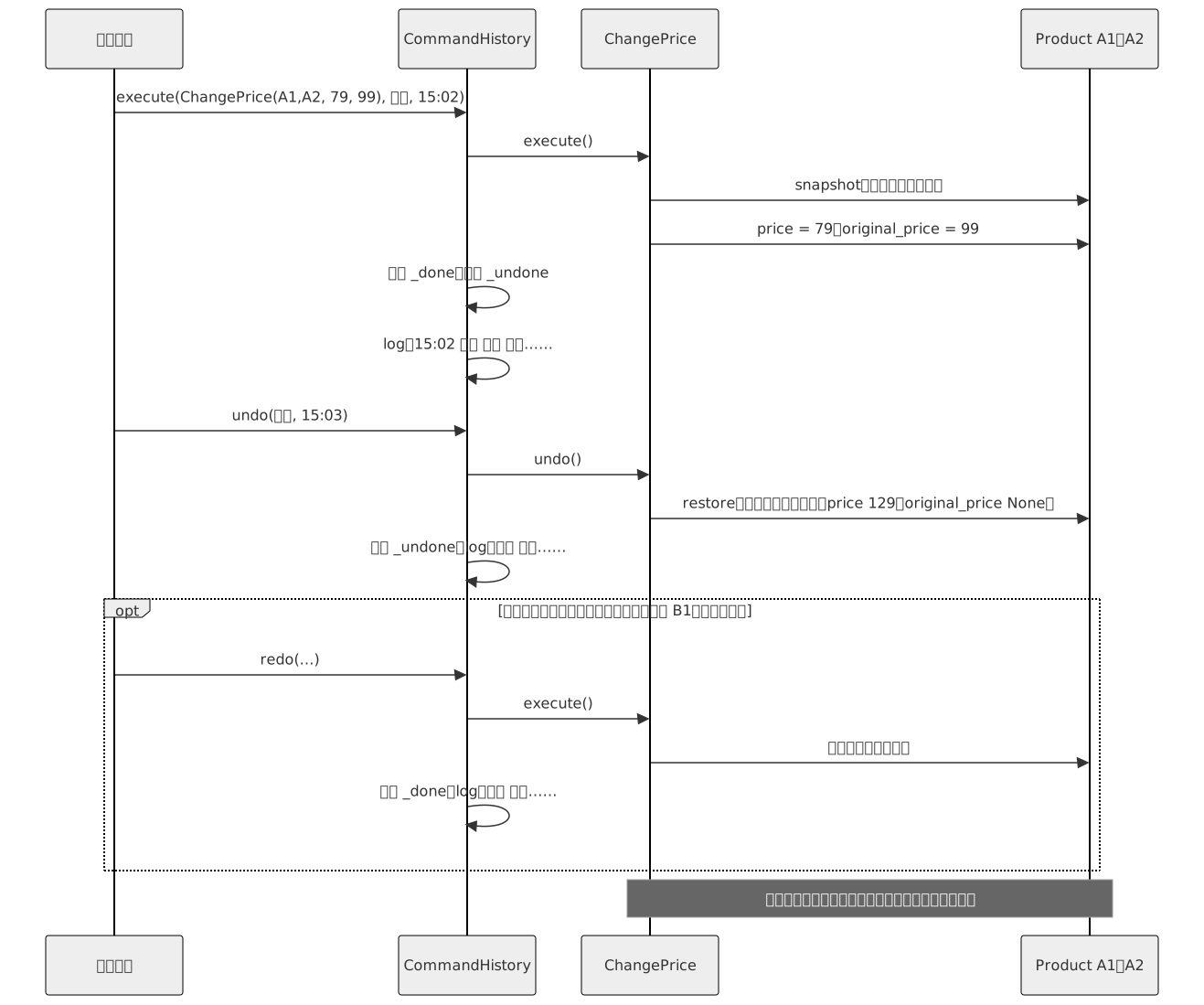
看中间的 undo() 那一段:ChangePrice 把整个快照放回去,price 和 original_price 一起回到改价之前。
逐条对照 19.3:
- ① 撤销:不再按操作名分支,
CommandHistory.undo()只管弹出最近的命令、调它的undo()。旧值不再是“想到哪个字段记哪个”,而是整个商品复制一份,以后给商品加字段,快照里自动就有。还顺带多了重做:撤销掉的命令放进_undone,redo()再执行一次;有了新操作就清空_undone。 - ② 日志:只在
CommandHistory里写,内容来自describe(),改价那一行现在写着“划线 99”。 - ③ 定时:
Scheduler存的是命令对象,不用按操作名分支。到点交给CommandHistory.execute(),所以定时操作同样进日志、能撤销,输出里 10-08 0 点执行的下架,9:10 被小李撤销又重做。 - 事故:同样点错、同样撤销,A1、A2 回到“现价 129”,没有划线价。
- 再加一种批量操作(比如批量改库存):写一个
ChangeStock类,实现三个方法,按钮回调构造它交给CommandHistory。撤销、日志、定时三处都不用动。
有三件事要说清楚:
- 撤销对不对,现在取决于每个命令有没有在执行前存下完整快照。本章两个命令都调
snapshot,所以不漏字段。但这是约定,不是保证:哪天有人写ChangeStock只存了库存数,撤销照样会漏,CommandHistory发现不了。快照也有代价:批量改一万个商品,历史里就存着一万份副本;商品里要是有嵌套的列表,浅拷贝会和原件共用它,得换成深拷贝。 - 撤销会覆盖别人的修改。快照是整个商品:改价之后,要是有人绕过
CommandHistory改了 A1 的名字,撤销改价会把名字也改回去。多人同时操作的后台,要么所有修改都走命令,要么撤销前比对商品的版本号,被改过就拒绝撤销。 Scheduler在内存里,进程一重启,排好的命令就没了。真实系统要把命令变成数据(操作名加参数)存进数据库,再读出来还原,19.7 的例二就是这种做法。
命令换来的是撤销、重做、日志、定时都写在一处,新的操作只写一个类。代价是原来一个函数写完的批量改价,现在是一个接口、两个命令类、一个历史类和一个调度类;读代码要从按钮回调跳到命令类,才看到真正改了什么。
19.5 模式定义
Section titled “19.5 模式定义”GoF 对命令的定义是:将一个请求封装为一个对象,从而使你可用不同的请求对客户进行参数化;对请求排队或记录请求日志,以及支持可撤销的操作。
换成本章的话:“请求”就是“把 A1、A2 改成 79 元”这件事,做成 ChangePrice 对象后,能被 Scheduler 排队,被 CommandHistory 记日志、撤销。“用不同的请求进行参数化”是说:持有命令的一方给什么命令就执行什么,就像给函数传不同的参数。

GoF 结构图里 Command 只有 execute();撤销在实现部分讨论:命令额外存下执行前的状态,再提供 unexecute(),本章叫 undo()。调用者(Invoker)持有命令、决定什么时候执行,本章是 CommandHistory 和 Scheduler。接收者(Receiver)是真正被改的对象,GoF 图里命令调它的 action(),本章的命令直接改 Product 的字段。
| 角色 | 在本章案例里是谁 | 职责 |
|---|---|---|
| 命令(Command) | Command |
声明执行操作的接口,本章还加了 undo() 和 describe() |
| 具体命令(ConcreteCommand) | ChangePrice、SetListed |
存下请求的参数和撤销要用的快照,执行时去改接收者 |
| 调用者(Invoker) | CommandHistory、Scheduler |
持有命令,在合适的时候调 execute() 或 undo() |
| 接收者(Receiver) | Product(放在 catalog 里) |
真正被改的对象,不知道命令的存在 |
| 客户(Client) | 按钮回调、入口代码 | 创建具体命令,指定改哪些商品,交给调用者 |
常见场景:
- 撤销和重做。编辑器、画图工具、本章的运营后台,每一步操作是一个命令,历史就是命令栈。
- 任务队列和定时任务。后台任务队列里的一条任务,就是“任务名加参数”做成的请求对象,由别的进程或到点再执行。
- 宏操作。几个命令组成一个大命令,一次执行、一次撤销,比如“大促上线”等于改价、上架、打标签三步。
- 事务日志与重放。按顺序记下执行过的操作,崩溃后从存档点重放,数据库的预写日志(write-ahead log)就是这个思路。
- 远程调用的请求对象。把“调哪个方法、带什么参数”做成可序列化的对象,发到另一台机器上执行。
19.6 更简洁的写法
Section titled “19.6 更简洁的写法”不需要撤销时,命令只剩 execute()。和 17.6、18.6 一样,只有一个方法的接口就是一个函数类型:命令就是“不带参数、不返回”的函数,参数用 functools.partial 或闭包(closure)提前绑好。需要撤销时,返回一对函数 (do, undo),快照放在闭包里:
import copyfrom collections.abc import Callablefrom dataclasses import dataclassfrom functools import partial

@dataclassclass Product:    sku: str    price: int    original_price: int | None = None    listed: bool = True

catalog = {"A1": Product("A1", 129), "B1": Product("B1", 89)}

def set_price(sku: str, price: int, original_price: int | None) -> None:    catalog[sku].price, catalog[sku].original_price = price, original_price

def set_listed(sku: str, listed: bool) -> None:    catalog[sku].listed = listed

def show(sku: str) -> None:    p = catalog[sku]    strike = f"原价 {p.original_price} " if p.original_price is not None else ""    print(f"{p.sku}:{strike}现价 {p.price},{'在售' if p.listed else '已下架'}")

Action = Callable[[], None]  # 不要撤销时,命令就是一个"不带参数、不返回"的函数

def change_price(sku: str, price: int, original_price: int | None) -> tuple[Action, Action]:    saved: list[Product] = []  # 要撤销时,返回一对 (do, undo),快照放在闭包里
    def do() -> None:        saved.append(copy.copy(catalog[sku]))  # 执行时才拍快照        set_price(sku, price, original_price)
    def undo() -> None:        vars(catalog[sku]).update(vars(saved.pop()))
    return do, undo

if __name__ == "__main__":    queue: list[Action] = [partial(set_price, "A1", 79, 99), lambda: set_listed("B1", False)]    for job in queue:  # 排队、定时:先存起来,到时候再调        job()    show("A1")    show("B1")
    done: list[tuple[Action, Action]] = []    do, undo = change_price("A1", 59, 129)    do()    done.append((do, undo))    show("A1")    done.pop()[1]()  # 撤销最近一次:调它的 undo    show("A1")
# 输出:# A1:原价 99 现价 79,在售# B1:现价 89,已下架# A1:原价 129 现价 59,在售# A1:原价 99 现价 79,在售
TS 用箭头函数绑参数,一对函数写成元组:
interface Product {  sku: string;  price: number;  originalPrice: number | null;  listed: boolean;}
const catalog = new Map<string, Product>([  ["A1", { sku: "A1", price: 129, originalPrice: null, listed: true }],  ["B1", { sku: "B1", price: 89, originalPrice: null, listed: true }],]);
function setPrice(sku: string, price: number, originalPrice: number | null): void {  Object.assign(catalog.get(sku)!, { price, originalPrice });}
function setListed(sku: string, listed: boolean): void {  catalog.get(sku)!.listed = listed;}
function show(sku: string): void {  const p = catalog.get(sku)!;  const strike = p.originalPrice !== null ? `原价 ${p.originalPrice} ` : "";  console.log(`${p.sku}:${strike}现价 ${p.price},${p.listed ? "在售" : "已下架"}`);}
type Action = () => void; // 不要撤销时,命令就是一个"不带参数、不返回"的函数
function changePrice(sku: string, price: number, originalPrice: number | null): [Action, Action] {  const saved: Product[] = []; // 要撤销时,返回一对 [do, undo],快照放在闭包里  const doIt = () => {    saved.push({ ...catalog.get(sku)! }); // 执行时才拍快照    setPrice(sku, price, originalPrice);  };  const undo = () => {    Object.assign(catalog.get(sku)!, saved.pop());  };  return [doIt, undo];}
const queue: Action[] = [() => setPrice("A1", 79, 99), () => setListed("B1", false)];for (const job of queue) job(); // 排队、定时:先存起来,到时候再调show("A1");show("B1");
const done: [Action, Action][] = [];const [doIt, undo] = changePrice("A1", 59, 129);doIt();done.push([doIt, undo]);show("A1");done.pop()![1](); // 撤销最近一次:调它的 undoshow("A1");
// 输出:// A1:原价 99 现价 79,在售// B1:现价 89,已下架// A1:原价 129 现价 59,在售// A1:原价 99 现价 79,在售
结构还是同一个:调用者手里一串“以后再调”的东西。语言替你省掉的是 Command 接口和每个命令类:partial(set_price, "A1", 79, 99) 就相当于一个 ChangePrice 对象,参数存在它里面。用函数写时有两点要留意:
- 快照要在执行时拍,不能在创建时拍。
change_price返回时只建了一个空列表,do()被调用时才复制商品。要是创建时就复制,从创建到执行之间别人改过的东西,撤销时会被一起抹掉;定时命令白天创建、0 点执行,最容易中招。 - 函数说不出自己是什么。日志要写“改价 A1:现价 79”,函数只有一个名字
set_price或<lambda>,参数得从partial的.args里翻;TS 的箭头函数连这都没有。函数也没法序列化存进数据库。
什么时候类仍然值得写:要写日志;命令由好几个人写,接口提醒每个人都得实现 undo();命令要存盘或发到别的机器。
19.7 真实系统里的例子
Section titled “19.7 真实系统里的例子”例一:Django 的数据库迁移(Python)
Section titled “例一:Django 的数据库迁移(Python)”Django 的迁移文件(migration)里有一个 operations 列表,每项是一个操作对象,比如 AddField 加一列、RenameField 改列名,都继承 Operation,各自实现 database_forwards(正向改表结构)和 database_backwards(反向改回去),还有一个 describe() 返回一句人能读懂的说明。python manage.py migrate 按顺序调每个操作的 database_forwards;回滚到更早的迁移时,倒过来逐个调 database_backwards。大致如此:真实的方法还要传入迁移前后的模型状态;RunPython 这类操作没给反向函数时是不可逆的,回滚会报 IrreversibleError。下面模拟两个操作和一个执行器,SQL 只打印不执行:
from abc import ABC, abstractmethod

class SchemaEditor:  # 对应 BaseDatabaseSchemaEditor:真实的会生成并执行对应数据库的 SQL,这里只打印    def execute(self, sql: str) -> None:        print(sql)

class Operation(ABC):  # 对应 django.db.migrations.operations.base.Operation    reversible = True  # 真实的 RunPython 没给 reverse_code 时为 False,回滚会报 IrreversibleError
    @abstractmethod  # 真实签名还有 from_state、to_state 两个模型状态,这里省略    def database_forwards(self, app_label: str, editor: SchemaEditor) -> None: ...
    @abstractmethod    def database_backwards(self, app_label: str, editor: SchemaEditor) -> None: ...
    @abstractmethod    def describe(self) -> str: ...

class AddField(Operation):    def __init__(self, model_name: str, name: str, field: str) -> None:        self.model_name, self.name, self.field = model_name, name, field
    def database_forwards(self, app_label: str, editor: SchemaEditor) -> None:        editor.execute(f"ALTER TABLE {app_label}_{self.model_name} ADD COLUMN {self.name} {self.field};")
    def database_backwards(self, app_label: str, editor: SchemaEditor) -> None:        editor.execute(f"ALTER TABLE {app_label}_{self.model_name} DROP COLUMN {self.name};")
    def describe(self) -> str:        return f"Add field {self.name} to {self.model_name}"

class RenameField(Operation):    def __init__(self, model_name: str, old_name: str, new_name: str) -> None:        self.model_name, self.old_name, self.new_name = model_name, old_name, new_name
    def _rename(self, app_label: str, editor: SchemaEditor, old: str, new: str) -> None:        editor.execute(f"ALTER TABLE {app_label}_{self.model_name} RENAME COLUMN {old} TO {new};")
    def database_forwards(self, app_label: str, editor: SchemaEditor) -> None:        self._rename(app_label, editor, self.old_name, self.new_name)
    def database_backwards(self, app_label: str, editor: SchemaEditor) -> None:        self._rename(app_label, editor, self.new_name, self.old_name)
    def describe(self) -> str:        return f"Rename field {self.old_name} on {self.model_name} to {self.new_name}"

class Migration:  # 对应 django.db.migrations.Migration:一个迁移文件就是一串操作    def __init__(self, app_label: str, name: str, operations: list[Operation]) -> None:        self.app_label, self.name, self.operations = app_label, name, operations

class MigrationExecutor:  # 对应 MigrationExecutor;真实版本里这两个循环在 Migration.apply / unapply 中,大致如此    def __init__(self, editor: SchemaEditor) -> None:        self.editor = editor
    def apply_migration(self, migration: Migration) -> None:  # migrate:按顺序正向执行        print(f"Applying {migration.app_label}.{migration.name}")        for op in migration.operations:            print(f"  {op.describe()}")            op.database_forwards(migration.app_label, self.editor)
    def unapply_migration(self, migration: Migration) -> None:  # 回滚:倒序反向执行        print(f"Unapplying {migration.app_label}.{migration.name}")        for op in reversed(migration.operations):            print(f"  撤销 {op.describe()}")            op.database_backwards(migration.app_label, self.editor)

if __name__ == "__main__":    migration = Migration("shop", "0002_strike_price", [        AddField("product", "strike_price", "integer NULL"),        RenameField("product", "strike_price", "original_price"),    ])    executor = MigrationExecutor(SchemaEditor())    executor.apply_migration(migration)  # python manage.py migrate shop    executor.unapply_migration(migration)  # python manage.py migrate shop 0001
# 输出:# Applying shop.0002_strike_price#   Add field strike_price to product# ALTER TABLE shop_product ADD COLUMN strike_price integer NULL;#   Rename field strike_price on product to original_price# ALTER TABLE shop_product RENAME COLUMN strike_price TO original_price;# Unapplying shop.0002_strike_price#   撤销 Rename field strike_price on product to original_price# ALTER TABLE shop_product RENAME COLUMN original_price TO strike_price;#   撤销 Add field strike_price to product# ALTER TABLE shop_product DROP COLUMN strike_price;
每个 Operation 是一个命令,database_forwards、database_backwards 就是 execute、undo,describe() 连名字都一样;执行器是调用者。迁移文件是存在磁盘上的命令列表,每台机器都能按同样的顺序重放。和本章不同,迁移的撤销靠反向操作(加列的反向是删列),不靠快照:给整张表拍快照往往太贵。代价是删列时列里的数据也没了,“可逆”只保证表结构回得去。
例二:Redux 的 action(TypeScript)
Section titled “例二:Redux 的 action(TypeScript)”Redux 是前端常用的状态管理库。对状态的每次修改都要写成一个 action,一个普通对象,比如 { type: "cart/add", payload: { sku: "A1", qty: 1 } },交给 store.dispatch();store 把当前状态和 action 交给 reducer 这个纯函数,算出新状态。action 只是数据,可以 JSON 序列化:Redux DevTools 记下每个 dispatch 过的 action,能逐步查看、跳回某一步、导出给别人重放。Redux 本身不提供撤销,要另加,常见的是 redux-undo 这类库,它包住 reducer,把过去的状态存起来,大致如此。下面不用库,模拟一个记录 action 日志、能重放的 store:
type Action = // action 是普通对象:可以 JSON 序列化、存下来、发到别处  | { type: "cart/add"; payload: { sku: string; qty: number } }  | { type: "cart/remove"; payload: { sku: string } };
type CartState = Record<string, number>; // sku → 件数
function cartReducer(state: CartState, action: Action): CartState { // 纯函数:旧状态 + action → 新状态  switch (action.type) {    case "cart/add":      return { ...state, [action.payload.sku]: (state[action.payload.sku] ?? 0) + action.payload.qty };    case "cart/remove": {      const { [action.payload.sku]: _removed, ...rest } = state;      return rest;    }  }}
class Store { // 对应 Redux 的 createStore:真实的还有 subscribe、中间件,这里省略  private state: CartState;  readonly log: string[] = []; // 像 Redux DevTools 那样记下每个 action
  constructor(private readonly reducer: typeof cartReducer, private readonly initial: CartState) {    this.state = initial;  }
  dispatch(action: Action): void {    this.log.push(JSON.stringify(action));    this.state = this.reducer(this.state, action);  }
  getState(): CartState {    return this.state;  }
  replay(log: string[]): void { // 从初始状态把记下的 action 重新执行一遍    const actions = [...log]; // 先复制:传进来的可能就是自己的 log,下面要清空它    this.state = this.initial;    this.log.length = 0;    for (const line of actions) this.dispatch(JSON.parse(line) as Action);  }}
const store = new Store(cartReducer, {});store.dispatch({ type: "cart/add", payload: { sku: "A1", qty: 1 } });store.dispatch({ type: "cart/add", payload: { sku: "B1", qty: 2 } });store.dispatch({ type: "cart/remove", payload: { sku: "A1" } });console.log(`现在:${JSON.stringify(store.getState())}`);store.log.forEach((line) => console.log(`日志:${line}`));
const replica = new Store(cartReducer, {}); // 比如把用户的 action 日志拿到本地重现 bugreplica.replay(store.log);console.log(`重放全部:${JSON.stringify(replica.getState())}`);replica.replay(store.log.slice(0, -1)); // 去掉最后一条再重放,相当于撤销它console.log(`去掉最后一条:${JSON.stringify(replica.getState())}`);
// 输出:// 现在:{"B1":2}// 日志:{"type":"cart/add","payload":{"sku":"A1","qty":1}}// 日志:{"type":"cart/add","payload":{"sku":"B1","qty":2}}// 日志:{"type":"cart/remove","payload":{"sku":"A1"}}// 重放全部:{"B1":2}// 去掉最后一条:{"A1":1,"B1":2}
action 是命令,dispatch 是调用者,购物车状态是接收者。和本章不同,action 自己没有 execute(),执行逻辑都在 reducer 里,命令只剩“做什么”的数据,所以能存盘、能发出去,正好解决 19.4 说的存盘问题。撤销也换了做法:不写反向操作,而是从初始状态把除最后一条外的 action 重放一遍。前提是 reducer 是纯函数,同样的 action 序列总算出同样的状态。
19.8 什么时候别用
Section titled “19.8 什么时候别用”- 操作立即执行,不撤销、不排队、不记录。比如“刷新缓存”按钮,没人需要撤销它。写成
RefreshCache命令类交给CommandHistory,一行调用变成一个类,历史栈里还多了一条没法撤销的记录,撤销按钮点到它只能报错。 - 命令只是把一个方法调用包一层。
ShipOrderCommand.execute()里只有一行order_service.ship(order_id),不撤销,也没人把它存起来。每加一个业务方法就要配一个命令类,读代码的人要从按钮跳到命令类、再跳到服务。只是想统一记日志,给服务方法加一个装饰器(第 10 章)就够了。 - 撤销牵涉外部系统。改价之后,系统给收藏了这款耳机的用户发了降价短信。小王撤销改价,价格回去了,短信却收不回来,用户点进来发现没降价。这种操作要明确叫“补偿”(compensation),不叫“撤销”:补偿是再做一件事去抵消影响,比如发一条更正短信、已按活动价下的单照常发货。
undo()不能假装短信没发过;补偿不了的操作,应该像 Django 的RunPython那样标成不可逆,撤销按钮直接拒绝。
19.9 容易混淆的模式
Section titled “19.9 容易混淆的模式”| 模式 | 意图 | 区别 |
|---|---|---|
| 命令(Command) | 把一个请求封装成对象 | 封装的是“做什么”:改哪些商品、改成多少;可以存起来排队、记日志、撤销 |
| 策略(Strategy) | 把一族可互换的算法各自封装 | 封装的是“怎么做”:同一件事(算优惠)的不同算法,用完不存、不撤销。见第 17 章 |
| 备忘录(Memento) | 保存对象的内部状态,以后恢复 | 撤销靠快照,存下“之前是什么样”;命令撤销可以靠反向操作,知道“做了什么”就能做回去。见第 25 章 |
两组都能用一个问题当场判断:
- 命令还是策略:问“这个对象会不会被存起来以后再用”。第 17 章的
FullReduction交给Checkout当场算完,没人要撤销它,是策略。本章的ChangePrice带着具体的商品和价格,放进历史栈、排进调度器,执行完还留着等撤销,是命令。两者结构上都是一个接口、几个实现类,区别在对象里装的是一个算法,还是一次具体的请求。 - 命令还是备忘录:问“撤销时靠反向操作,还是靠存下来的状态”。练一练的
InsertText撤销时删掉自己插入的那段,靠反向操作,是纯粹的命令。本章的ChangePrice两者都用了:命令记住“做了什么”、按顺序撤销;快照负责“恢复成什么样”,它就是一个简化的备忘录。编辑器常这样搭配:能算出反向操作的用反向操作,算不出的再存快照。
19.10 练一练
Section titled “19.10 练一练”文本框的撤销与重做:写一个 TextBox,只有一个字段 text。写两个命令:InsertText(box, pos, s) 在位置 pos 插入字符串 s,DeleteRange(box, start, end) 删掉从 start 到 end 之前的那一段。再写一个 History,提供 execute、undo、redo。
依次执行:在 0 处插入“多练网”;在 3 处插入”:设计模式”;删除 3 到 4(那个冒号)。然后撤销两次、重做一次,再在 0 处插入”【新】“,最后再重做一次。每一步打印文本。Python 和 TS 各写一版。
提示:这次不用快照,用反向操作。InsertText 的撤销是删掉自己插入的那段;DeleteRange 执行时记下删掉的内容,撤销时插回原处。最后那次重做应该什么都不做:撤销后又执行了新命令,重做栈要清空,否则会在新文本上按旧位置再删一次,删掉的是“多”。TS 里 History 和浏览器的全局对象重名,文件开头加一行 export {}; 把它变成模块。
19.11 小结
Section titled “19.11 小结”- 命令把“要做的一件事”做成对象,参数和撤销要用的旧状态都在里面;持有它的一方只调
execute()、undo()。 - 撤销、重做、日志、定时都写在调用者一处,加一种操作只写一个命令类。
- 撤销对不对,取决于每个命令执行前存下了什么;外部系统的副作用撤销不了,只能补偿。
- 不需要撤销时,命令就是一个绑好参数的函数;需要撤销时,是一对
(do, undo)。要写日志、要存盘时,类更合适。 - 和策略的区别看对象会不会被存起来;和备忘录的区别看撤销靠反向操作还是靠快照。